
Overview
The Property Data API lets you pull our computed property valuations and enriched property records programmatically — from your own software, a spreadsheet tool, or a no-code platform. Every response is a transformed, value-added product (it always carries our computed ARV/AVM), so you can use the data in your downstream workflows.
There are two products, both billed per query:
- ARV / AVM Valuation — our computed after-repair value and automated valuation for an address.
- Enriched Property Record — that same valuation plus property details and owner name & mailing address.
Available on Pro+ and Dealmaker. API access is included with your paid plan — there's no separate application or approval. Usage is pay-as-you-go and draws from your prepaid credit balance.
Get your API key
- Go to Integrations & Apps in the left sidebar.
- Find the Property Data API card and click Open.
- Enter a label (e.g. "Production") and click Create key.
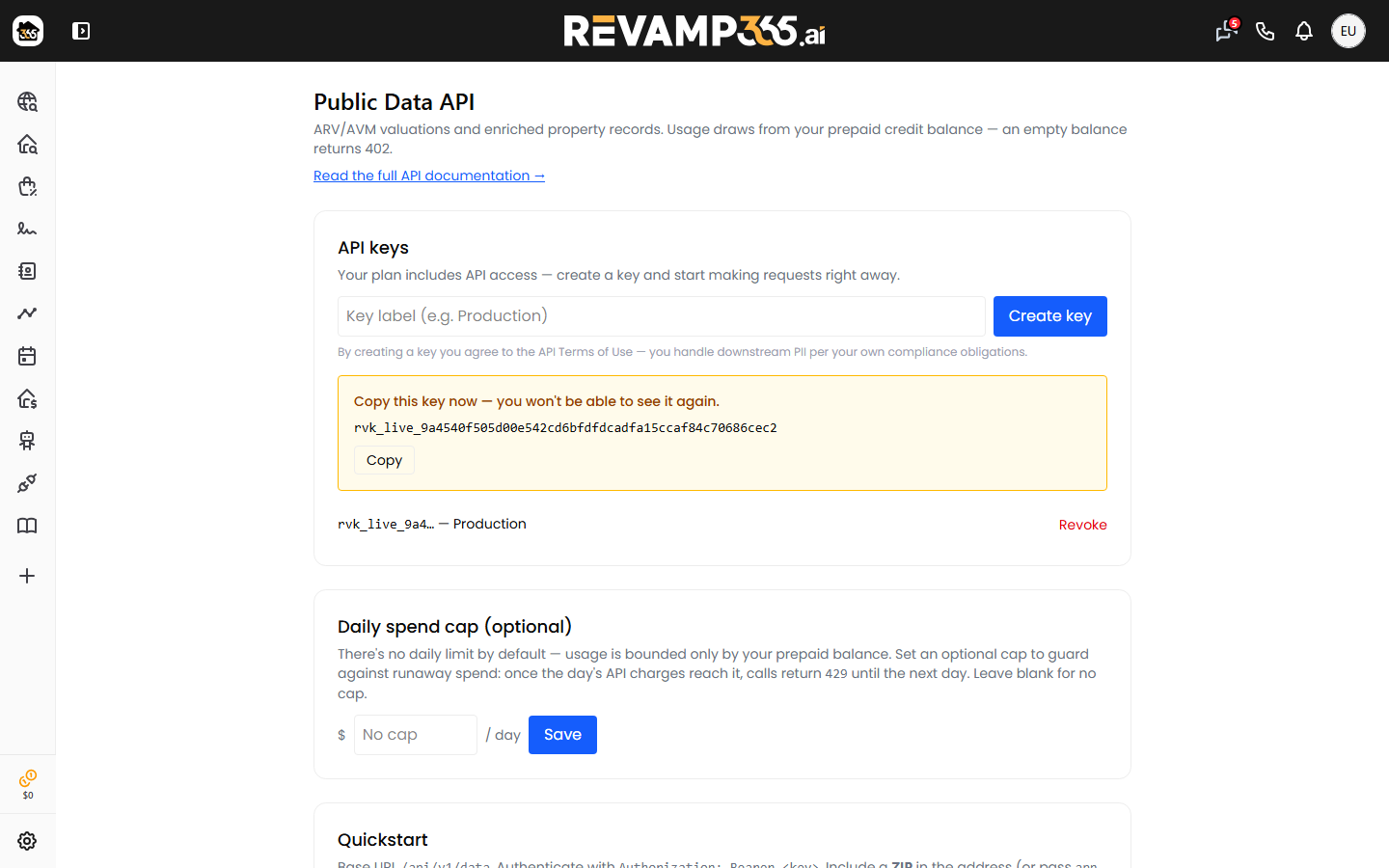
- Copy the key shown — it starts with
rvk_live_and is shown once. Store it somewhere safe; you can't view it again. If you lose it, just create a new one and revoke the old.
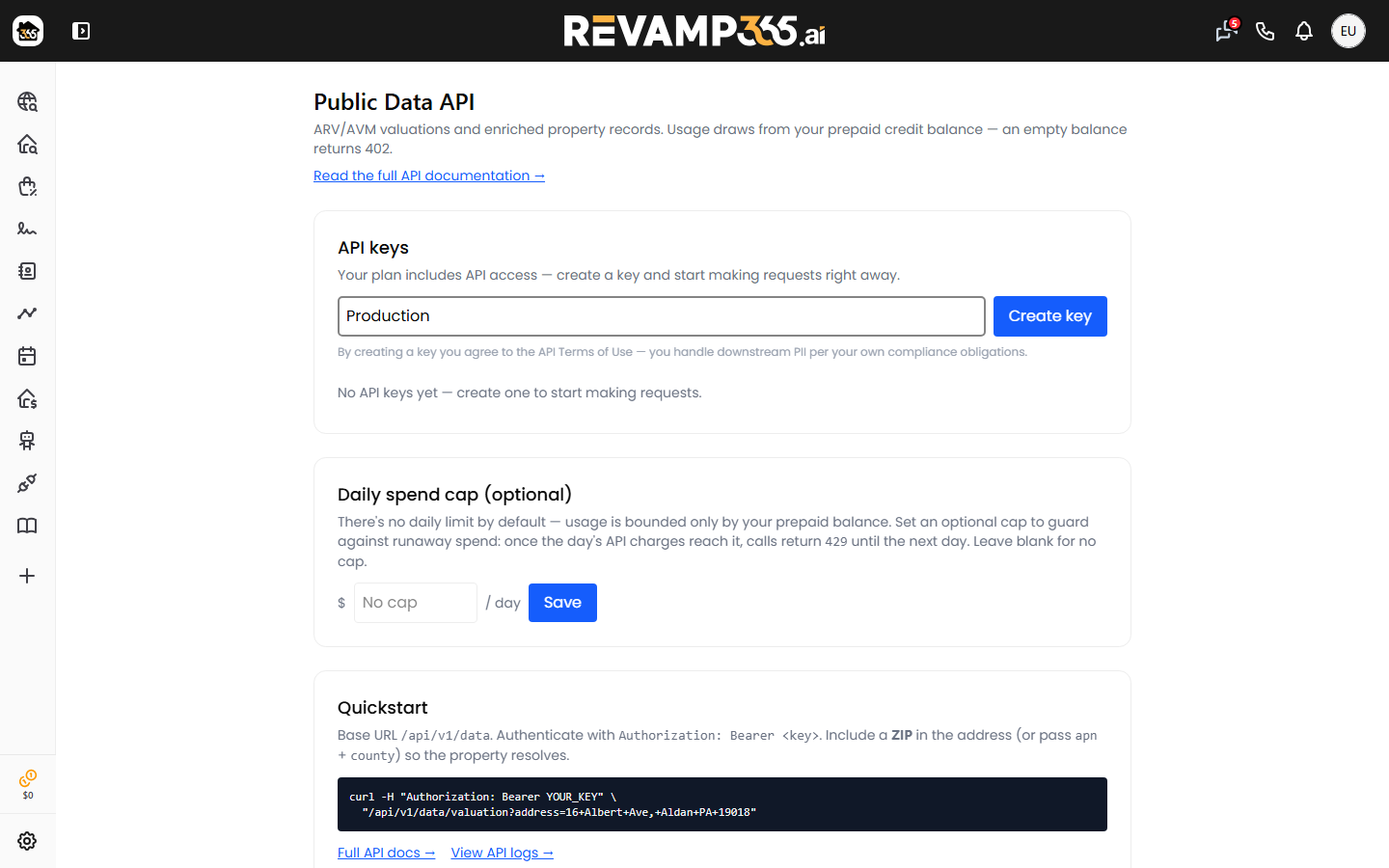
You can create multiple keys (one per app/environment) and revoke any of them at any time from the same screen. Revoking a key immediately stops it from working.
Authentication
Send your key as a Bearer token on every request:
Authorization: Bearer rvk_live_xxxxxxxxxxxxxxxxxxxxxxxx
(An X-API-Key: rvk_live_... header also works if a Bearer token is inconvenient for your client.)
Base URL
All endpoints live under /api/v1/data on your Revamp365 account domain, for example:
https://revamp365.ai/api/v1/data
Quickstart
Check that your key works (this call is free and never charges you):
curl -H "Authorization: Bearer rvk_live_YOUR_KEY" \
  "https://revamp365.ai/api/v1/data/ping"
A successful response shows your plan, rate limit, prepaid balance, and today's spend. This example is for an account with a $50 daily spend cap set; without a cap, daily_spend_cap_cents and today_remaining_cents are null:
{
  "success": true,
  "plan": "dealmaker",
  "rate_limit": 120,
  "balance_cents": 4250,
  "daily_spend_cap_cents": 5000,
  "today_spend_cents": 75,
  "today_remaining_cents": 4925
}
Endpoint: ARV / AVM Valuation
GET /api/v1/data/valuation
Identify the property by any one of: a full address including the 5-digit ZIP, structured fields (street + zip, optionally city and state), or an apn plus county (the county's 5-digit FIPS code). The ZIP is required for address lookups — an address without one returns 404 (not charged). Optional hints — sqft, property_type, lat, lng — can improve accuracy. The /property response returns the parcel's apn, which you can store and reuse for later lookups.
curl -H "Authorization: Bearer rvk_live_YOUR_KEY" \
  "https://revamp365.ai/api/v1/data/valuation?address=123+Main+St,+Austin,+TX+78701"
{
  "success": true,
  "data": {
    "avm": 312000,
    "arv": 358000,
    "source": "mls",
    "accuracy_score": 0.91,
    "comp_count": 8,
    "valued": true,
    "valued_at": "2026-06-07T18:20:00+00:00"
  },
  "meta": {
    "request_id": "…",
    "billable_units": 1,
    "unit_type": "per_query",
    "valued": true,
    "cost": 0.05,
    "cached": false
  }
}
Endpoint: Enriched Property Record
GET /api/v1/data/property
Same inputs as the valuation endpoint. Returns the computed valuation block plus property details and owner information.
curl -H "Authorization: Bearer rvk_live_YOUR_KEY" \
  "https://revamp365.ai/api/v1/data/property?address=123+Main+St,+Austin,+TX+78701"
{
  "success": true,
  "data": {
    "valuation": { "avm": 312000, "arv": 358000, "comp_count": 8, "valued": true },
    "address": "123 Main St",
    "city": "Austin", "state": "TX", "zip": "78701",
    "beds": 3, "baths": 2, "sqft": 1800, "year_built": 1995,
    "lot_sqft": 6000, "assessed_value": 240000,
    "last_sale_price": 250000, "last_sale_date": "2023-01-01",
    "lat": 30.26, "lng": -97.74,
    "owner_name": "Jane Doe",
    "mailing_address": "PO Box 1 Austin TX 78701"
  },
  "meta": { "request_id": "…", "billable_units": 1, "unit_type": "per_query", "valued": true, "cost": 0.10, "cached": false }
}
Pricing & billing
You're billed per query at your plan's rate. Charges draw from your prepaid credit balance (the same balance skip tracing and AI usage use).
| Product | Endpoint | Pro+ | Dealmaker |
|---|---|---|---|
| ARV / AVM Valuation | /valuation |
$0.10 / query | $0.05 / query |
| Enriched Property Record | /property |
$0.15 / query | $0.10 / query |
- You only pay for results. If we can't produce a valuation (no comparable sales), the call returns
"valued": falsewith"billable_units": 0and you're not charged./propertystill returns the property + owner details in that case, free. - No charge for misses. If no property is found (404) or the data provider is unavailable (502), you're not charged.
- Cached results still bill. A repeated lookup may be served from cache (
"cached": true) and is billed normally — you still receive a deliverable result. - Each response's
meta.cost(US dollars) andmeta.billable_unitstell you exactly what that call cost.
Keep a funded balance. If your prepaid balance can't cover a call, the API returns 402 before doing any work. Top up (or enable auto top-up) on your billing page to keep requests flowing.
Daily spend cap (optional)
There's no daily limit by default — usage is bounded only by your prepaid balance. To guard against runaway usage, set a daily spend cap on the API Access screen (Integrations & Apps → Property Data API → Open). Once the day's API charges reach it, calls return 429 until the next day. Charges are tallied a few seconds after each call, so a fast burst of requests can run slightly past the cap.
Safe retries (idempotency)
If a request times out or your network blips, retrying could otherwise charge you twice. To make retries safe, send an Idempotency-Key header with a unique value per logical request:
curl -H "Authorization: Bearer rvk_live_YOUR_KEY" \
  -H "Idempotency-Key: my-request-9f2c1a" \
  "https://revamp365.ai/api/v1/data/valuation?address=123+Main+St,+Austin,+TX+78701"
Any retry sent with the same Idempotency-Key is billed at most once — the repeat returns the result with "billable_units": 0. Use a fresh key for each new lookup.
Rate limits
Each key is limited to 120 requests per minute. If you exceed it you'll get a 429 with a Retry-After header (and X-RateLimit-* headers) — back off and retry after the indicated delay.
Errors
| Status | Meaning | What to do |
|---|---|---|
| 401 | Missing, invalid, revoked, or expired key. | Check the Authorization header / create a new key. |
| 402 | Insufficient prepaid balance. Body includes balance_cents and required_cents. |
Top up credits (or enable auto top-up), then retry. |
| 403 | Plan no longer Pro+/Dealmaker, access revoked, or billing past due. | Resubscribe / resolve billing, or contact support. |
| 404 | No property matched your input. Not charged. | Make sure the address includes the 5-digit ZIP, or pass apn + county. |
| 429 | Rate limit exceeded, or the daily spend cap you set was reached. | Honor Retry-After, or wait until the next day (or raise/clear the cap on the API Access screen). |
| 502 | Upstream data provider was temporarily unavailable. Not charged. | Retry shortly (an Idempotency-Key makes this safe). |
Error bodies are JSON. Most look like { "success": false, "message": "…" }; the 402 body uses the credits shape (error, balance_cents, required_cents).
Code samples
Node (axios)
import axios from 'axios';

const api = axios.create({
  baseURL: 'https://revamp365.ai/api/v1/data',
  headers: { Authorization: `Bearer ${process.env.REVAMP_API_KEY}` },
});

const { data } = await api.get('/valuation', { params: { address: '123 Main St, Austin, TX 78701' } });
console.log(data.data.avm, data.data.arv, data.meta.cost);
PHP
$response = Http::withToken($apiKey)
    ->get('https://revamp365.ai/api/v1/data/property', [
        'address' => '123 Main St, Austin, TX 78701',
    ]);

$record = $response->json('data');
Data freshness
MLS-sourced figures are typically same-day; public-record attributes refresh on a 24–48 hour cycle; ownership is pulled fresh. Valuations are model estimates, not appraisals.
Need help?
Use /api/v1/data/ping to confirm your key and balance, and check API Logs (from the API Access screen) to see every request with its status, units, cost, and latency. Each response also includes a meta.request_id — include it when contacting support.
Related articles
- Understand billing, usage, and overages — how prepaid credits and auto top-up work
- Connect or change the credit card on file — the card used for credit top-ups
- View comparable sales (comps) for a listing or property — review comps for a property inside the app
- Outbound webhooks: stream contact events to your own systems — push CRM events to your own software