
Quick start
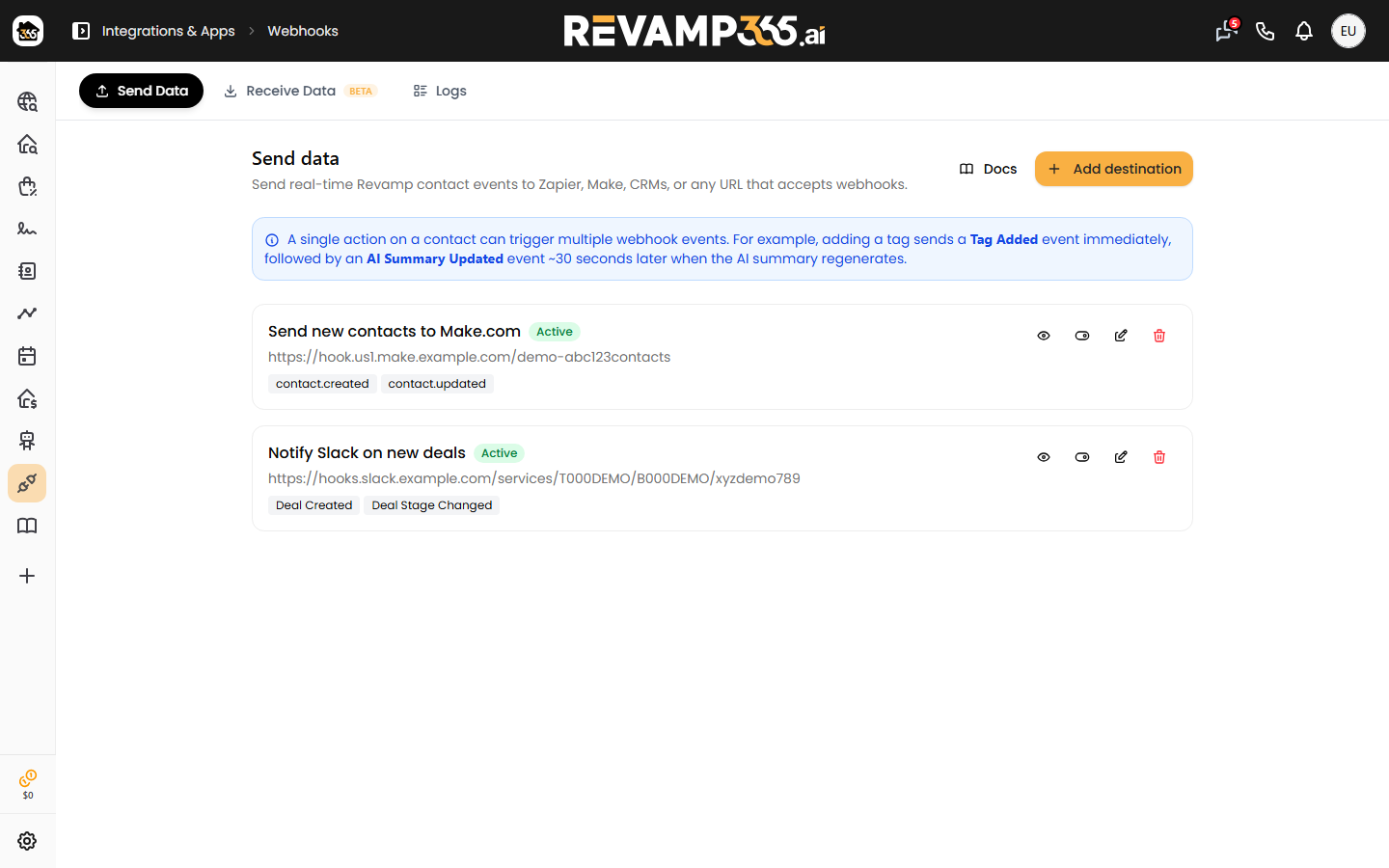
Revamp365 can send contact activity to any tool that accepts HTTPS webhooks. Create a Send Data destination, choose the contact events you want, copy the signing secret, and Revamp will POST each event to your URL.
- Go to Integrations & Apps - Webhooks - Send Data.
- Click Add destination.
- Enter the receiving URL from Zapier, Make, your CRM, or your own app.
- Select the events that should be sent.
- Save the destination and copy the signing secret shown after creation.
- Open Logs to confirm deliveries and retry failed attempts.
Events you can send
Each destination has its own event list. Select only what the receiving system needs.
| Event | Fires when |
|---|---|
contact_created |
A new contact is created. |
lead_status_changed |
A contact's lead status changes. |
lead_temperature_changed |
A contact's lead temperature changes. |
tag_added |
A tag is added to a contact. |
tag_removed |
A tag is removed from a contact. |
note_added |
A note is added to the contact timeline. |
ai_summary_updated |
The contact AI summary is regenerated. |
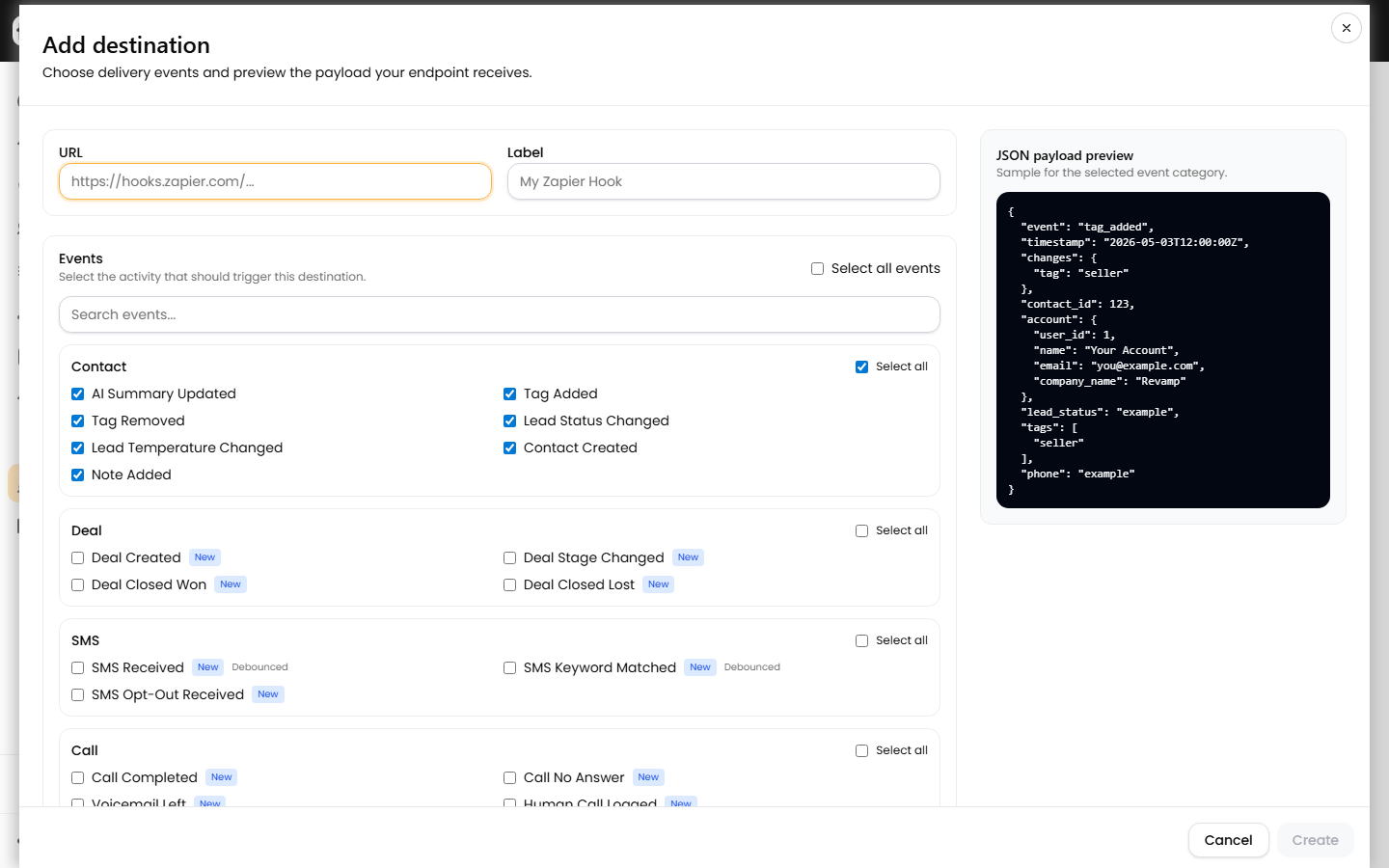
One action can send more than one event. For example, adding a tag can send tag_added, then an ai_summary_updated event after the summary refreshes. Use the delivery id or your own idempotency key to avoid duplicate work in the receiving system.
Zapier setup
- Create a Zap and choose the app you want to trigger from Revamp data.
- Add Webhooks by Zapier - Catch Hook.
- Copy the Zapier hook URL.
- In Revamp, open Webhooks - Send Data and add that URL as a destination.
- Trigger a matching contact event in Revamp, then test the Zapier trigger to inspect the payload.
Make.com setup
- Create a scenario with the Webhooks - Custom webhook trigger.
- Copy the webhook URL Make gives you.
- Add that URL as a Send Data destination in Revamp.
- Run the scenario once, then trigger a matching event in Revamp so Make can learn the payload shape.
Custom app setup
Your endpoint should accept a JSON POST, verify the signature, enqueue any slow work, and return a 2xx response quickly.
POST /revamp-webhook HTTP/1.1
Content-Type: application/json
X-Webhook-Signature: sha256=<hex_hmac_of_request_body>
X-Webhook-Event: tag_added

{
  "event": "tag_added",
  "occurred_at": "2026-05-02T15:30:00Z",
  "contact": {
    "id": 12345,
    "first_name": "Jane",
    "last_name": "Doe",
    "email": "jane@example.com",
    "phone": "+15125550100",
    "lead_status": "QUALIFIED",
    "tags": ["seller", "hot-lead"]
  },
  "changes": {
    "tag": "hot-lead"
  }
}
Verify signatures
Every destination gets a signing secret. Revamp signs the raw request body with HMAC-SHA256 and sends it in X-Webhook-Signature.
const crypto = require('crypto');

function isValidRevampSignature(rawBody, signatureHeader, secret) {
  const received = String(signatureHeader || '').replace(/^sha256=/, '');
  const expected = crypto
    .createHmac('sha256', secret)
    .update(rawBody)
    .digest('hex');

  return received.length === expected.length
    && crypto.timingSafeEqual(Buffer.from(received), Buffer.from(expected));
}
Verify against the raw request body, not JSON that has been parsed and re-stringified. Re-stringifying changes whitespace and key order, which changes the signature.
Monitor deliveries
Open Webhooks - Logs - Outbound deliveries to inspect each delivery. Logs include event type, destination URL, response status, response body, response time, payload, and retry state.
| Status | Meaning |
|---|---|
success |
The destination returned a 2xx response. |
pending_retry |
The delivery failed and has been queued for another attempt. |
failed |
Retries are exhausted or manual retry is available. |
Troubleshooting
- Destination will not save: make sure the URL starts with
https://and points to a public host. - Zapier or Make never sees a request: confirm the destination is active and subscribed to the event you triggered.
- Signature verification fails: verify the raw body before parsing JSON, and make sure you copied the latest secret.
- Deliveries time out: return a 2xx response quickly and process slow work asynchronously.
- Unexpected duplicate work: make your receiver idempotent because contact activity can produce multiple related events.
FAQ
Is this the same as Receive Data? No. Send Data pushes Revamp events out to your tools. Receive Data accepts lead payloads from tools like Zapier, Make, Carrot, and forms.
Can I have more than one destination? Yes. Use separate destinations for separate tools, teams, or event sets.
Can I retry a failed delivery? Yes. Open Logs, switch to Outbound deliveries, and click retry on a failed row.