
What CRM sync does (BETA)
CRM Sync connects Revamp365 to an external CRM and keeps records in lock-step. Today the supported providers are:
- Podio — full two-way sync (inbound webhooks from Podio + outbound pushes from Revamp).
- Salesforce — read-only view of existing connections. New Salesforce connections from Revamp are not yet enabled.
Time to connect Podio: ~15 minutes for a single app. Result: Contact changes in Revamp flow into Podio (and vice versa) with field-level mapping and conditional filters.
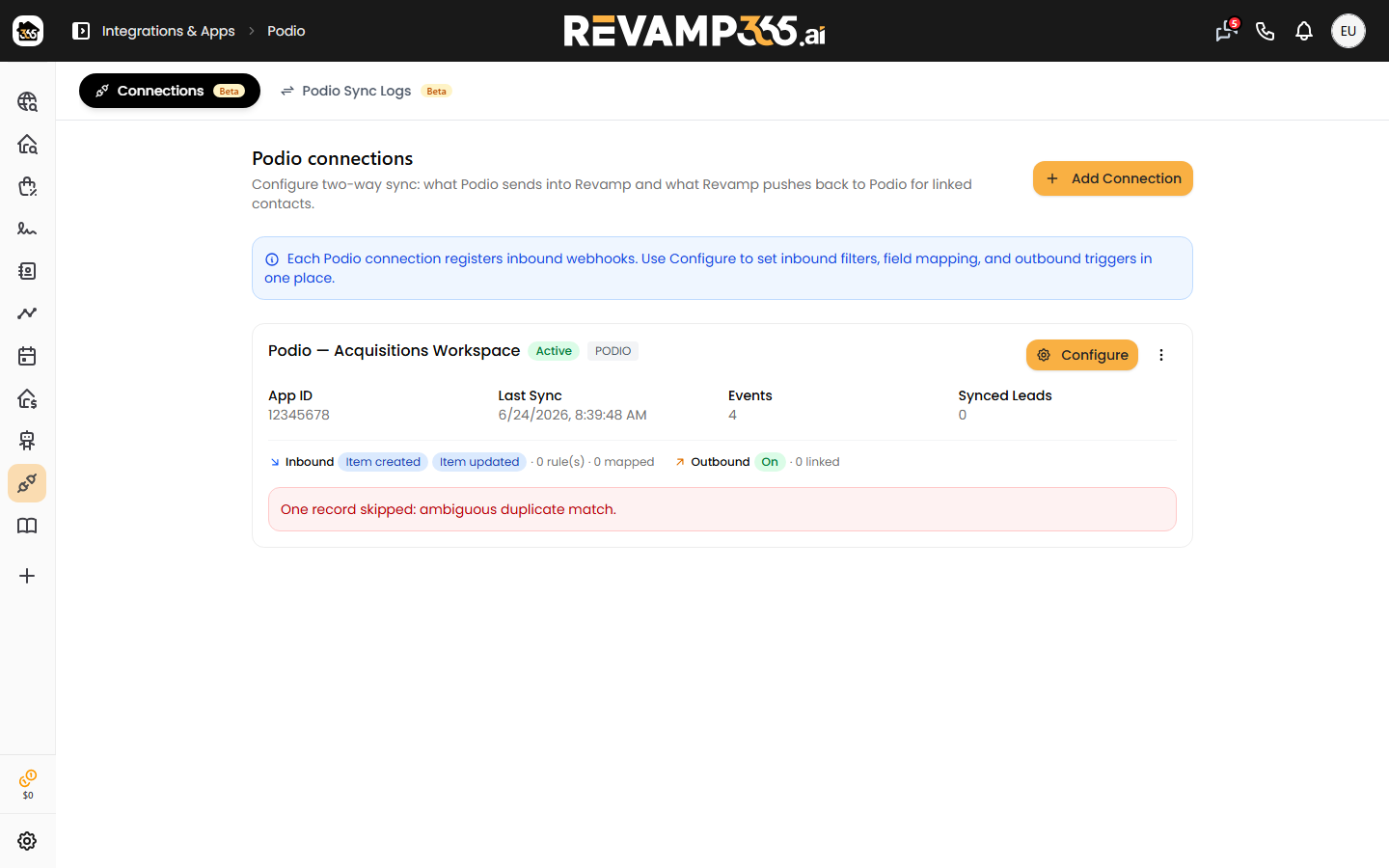
Where to find it
- Sidebar → Integrations & Apps → Apps → Podio (or Salesforce). Direct URL:
/integrations/app/podio. - The hub has two tabs:
- Connections — add / edit / delete CRM connections.
- Sync Logs — every inbound + outbound sync event.
The old /integrations/webhooks?tab=crm-connections URL still works but redirects here.
Connect a Podio app (six-step wizard)
- Credentials — paste your Podio
app_idandapp_token. (Podio Developer → API Keys → API key for your app.) - Direction — pick whether this connection is inbound, outbound, or both. Most customers pick both.
- Event types (inbound) — which Podio events should push into Revamp:
item.create— new Podio item creates a Revamp Contact.item.update— Podio item edit updates the matching Contact.item.delete— Podio item delete soft-deletes the Contact.comment.create— Podio comment becomes a Revamp timeline note.
- Conditions — optional filter expressions (e.g. only items where Status = Hot Lead).
- Field mapping — pair every Podio field with a Revamp Contact field. Unmapped Podio fields are ignored. Unmapped Revamp fields stay blank.
- Outbound events — pick which Revamp events push back to Podio:
contact_createdcontact.updatedlead_status_changedlead_temperature_changedtag_added/tag_removednote_addedai_summary_updated
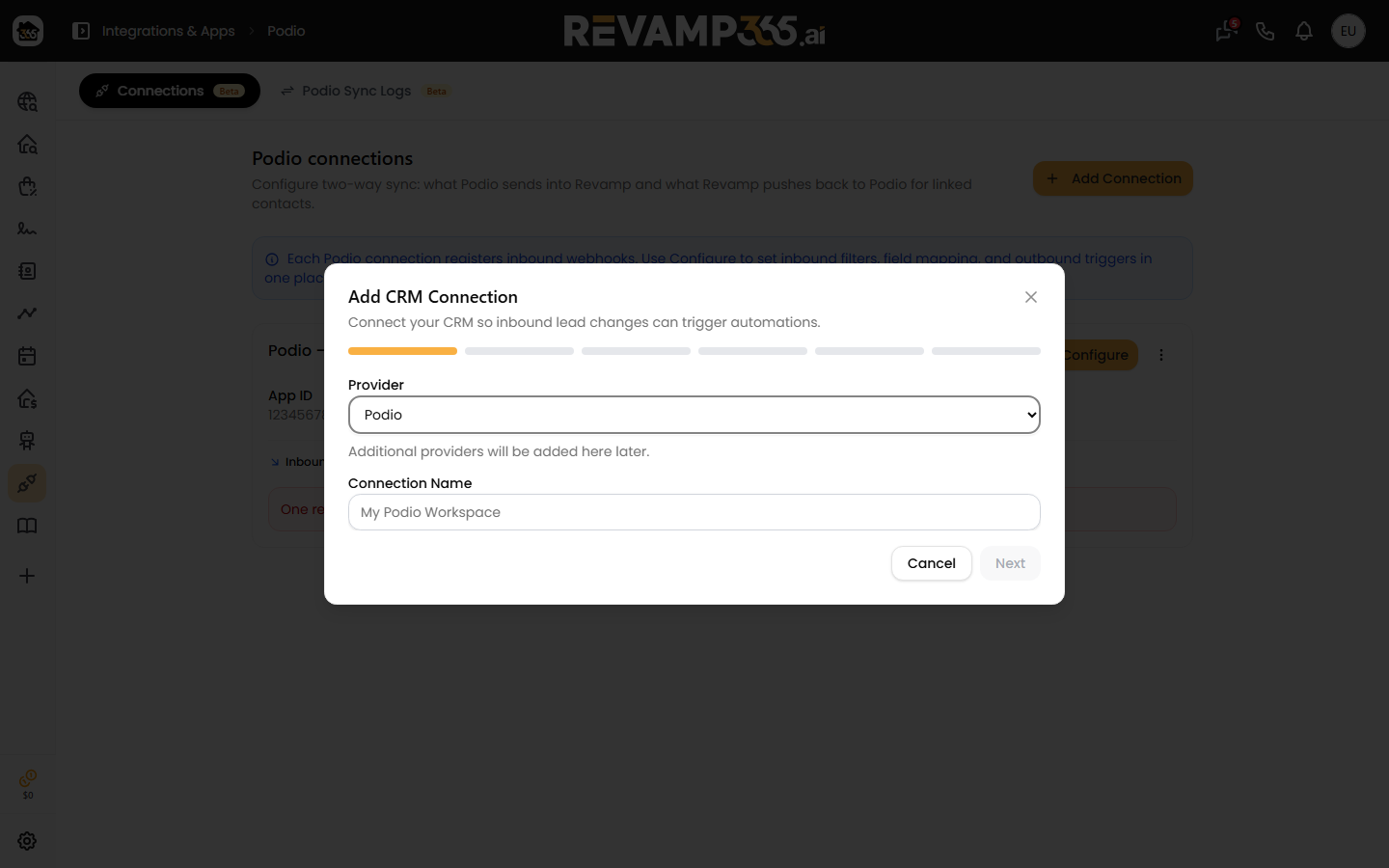
Click Test on the connection card after saving — Revamp will fetch the Podio app schema and confirm the connection is healthy.
Field mapping in detail
Each Revamp Contact field can be mapped to a Podio field by name. The mapping is stored as JSON on the connection (mapping_json for inbound, outbound_mapping_json for outbound). Examples:
| Revamp field | Podio field | Notes |
|---|---|---|
email |
"Email" (Podio email field type) | Lowercased on inbound. |
phone |
"Phone" (Podio phone field type) | Normalized to E.164 on inbound. |
first_name / last_name |
Two text fields, or split a "Full Name" | Configurable in mapping. |
lead_status |
Single-select Category | Option values must match Revamp's lead-status set. |
tags |
Multi-select Category | Unioned on update. |
custom_fields.* |
Any Podio field | Stored on the Revamp Contact's custom-field bag. |
Sync conditions (filters)
Conditions apply before the sync — events that don't match are dropped (logged as filtered). Examples:
- Only items where Podio "Status" is "Active Lead".
- Only items created in the last 30 days.
- Only Revamp Contacts with
contact_typecontaining "seller".
Use conditions to keep the sync narrow during rollout, then loosen them once you trust the mapping.
Sync Logs
Open Podio Sync Logs (or Salesforce Sync Logs). Each row is one sync event with direction (inbound / outbound) and one of:
| Inbound status | Meaning |
|---|---|
received |
Webhook arrived from Podio, queued. |
queued |
Awaiting processing. |
processed |
Contact created or updated. |
filtered |
Conditions excluded the event. |
failed |
Mapping or processing error. |
| Outbound status | Meaning |
|---|---|
pending |
Queued for push to Podio. |
success |
Podio accepted the change. |
skipped |
No mapping change to push. |
failed |
Podio rejected — see error column. |
dead |
Repeated failures, retries exhausted. |
Click any row to see the raw payload (both directions) and the resolved field-by-field changes.
Outbound rate limiting + pause
Outbound pushes can be throttled per connection (default: 60 / minute) to stay inside Podio's API limits. You can also pause outbound to a connection temporarily — for example during a bulk import — and unpause it once you're done.
- Trigger sync — manually send all queued outbound items now.
- Test — read a sample item from Podio to verify credentials.
- Delete — remove the connection. Sync logs are kept.
Salesforce (read-only)
The Salesforce hub looks the same as Podio's, but creating a new connection from inside Revamp is not yet enabled. If your account already has a Salesforce connection (provisioned by support), you can:
- View existing connections in the Connections tab.
- Inspect Salesforce Sync Logs for everything that's flowed through.
Reach out in support if you'd like a Salesforce connection set up.
Troubleshooting
| What you see | Likely cause | Fix |
|---|---|---|
| "Test" fails immediately | Bad app_id / app_token. |
Re-copy from Podio Developer. Token is per-app, not per-account. |
| Inbound items not appearing | Webhook subscription in Podio expired. | Edit connection → save again to re-subscribe. |
All inbound events are filtered |
Conditions too strict. | Open the connection → loosen or remove conditions. |
Outbound stuck on pending |
Connection paused or rate-limited. | Connection card → unpause / raise rate limit. |
| Field maps to wrong column | Field renamed in Podio after mapping. | Re-open the wizard's Field Mapping step → re-map → save. |
| Same Contact created twice | Mapping doesn't include email or phone for dedup. | Map at least email or phone as the dedup key. |
FAQ
Will outbound sync overwrite a value I set in Podio by hand? By default, yes — outbound pushes are authoritative for the mapped fields. If you want one-way protection, exclude the field from the outbound mapping.
How does Revamp dedup against Podio items? Connection stores the Podio item id alongside the Revamp Contact id. Subsequent updates target the same item.
Can I sync deals + tasks too? Today only Contacts are synced. Deals + tasks are on the roadmap.
What about HubSpot, Pipedrive, or GoHighLevel? Not yet. For unsupported CRMs, use outbound webhooks + your own translation layer.
Why is the whole CRM hub labeled Beta? Mapping ergonomics + conflict-resolution rules are still maturing. Sync is real and reliable; we just want flexibility to evolve the UI without surprising you.