
What outbound webhooks do
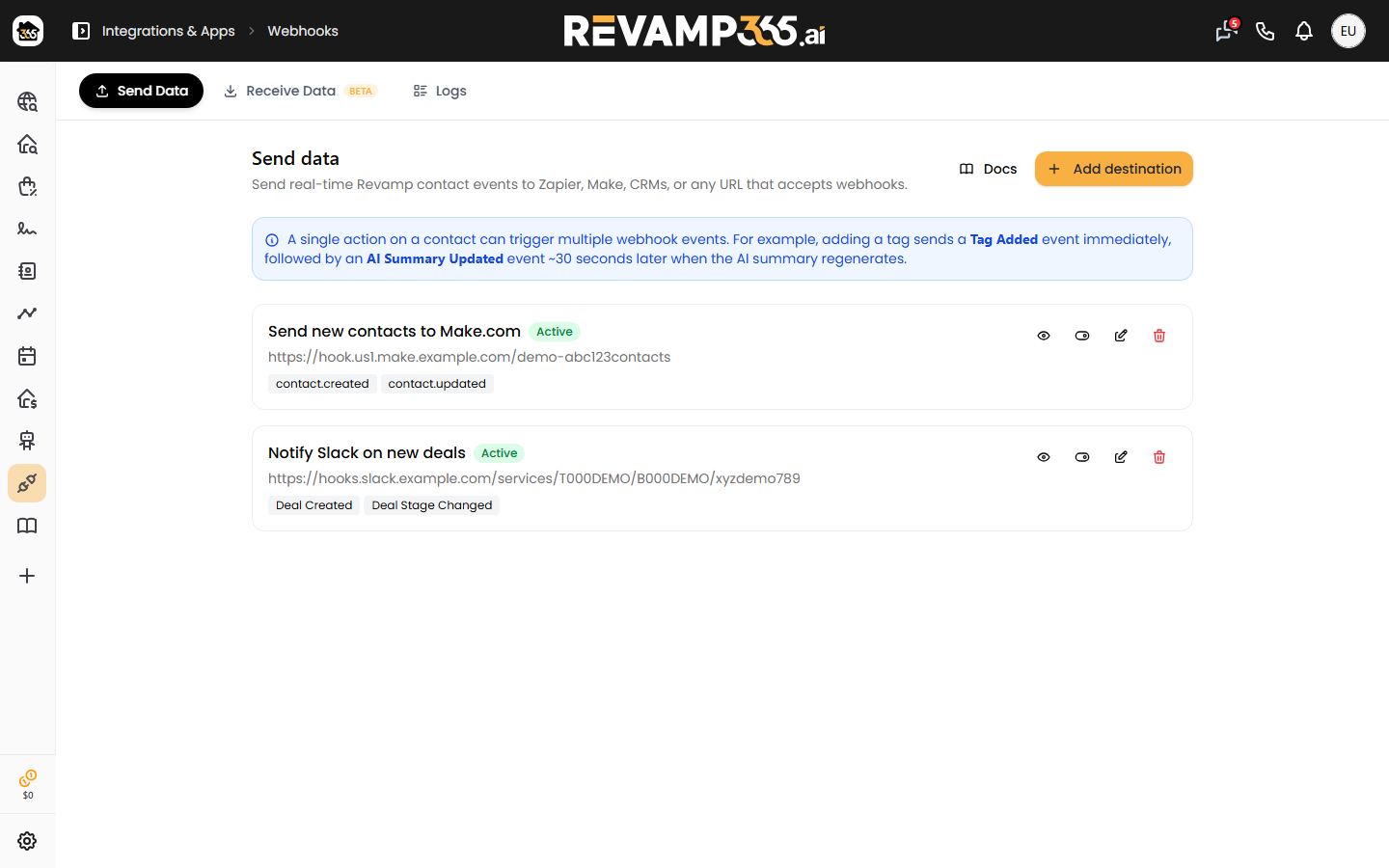
An outbound webhook endpoint is a URL you control that Revamp365 will HTTPS POST a JSON event to whenever something interesting happens in your CRM. Use this to mirror contact changes into your data warehouse, trigger a Slack alert, fire a Zap, or update an external system.
Time to set up: ~5 minutes. Result: events streamed to your endpoint with HMAC-signed payloads, automatic retries, and full delivery logs.
Outbound webhooks are different from inbound lead webhooks (which receive leads into Revamp). See Send leads into Revamp365 for the inbound flow.
Events you can subscribe to
Each endpoint has its own event allowlist. The current set:
| Event | Fires when |
|---|---|
contact_created |
A new Contact is added to the CRM (any source). |
lead_status_changed |
Lead status moves (e.g. NEW → QUALIFIED → WON). |
lead_temperature_changed |
Temperature changes (Cold / Cool / Warm / Hot). |
tag_added |
A tag is added to a Contact. |
tag_removed |
A tag is removed. |
note_added |
A timeline note is added to a Contact. |
ai_summary_updated |
The AI summary on a Contact is regenerated. |
One user action can fire multiple events. Adding a tag fires tag_added, then ~30 seconds later ai_summary_updated when the summary regenerates. Build your receiver to be idempotent.
Step 1 — Create an endpoint
- Open Integrations & Apps → Webhooks → Endpoints.
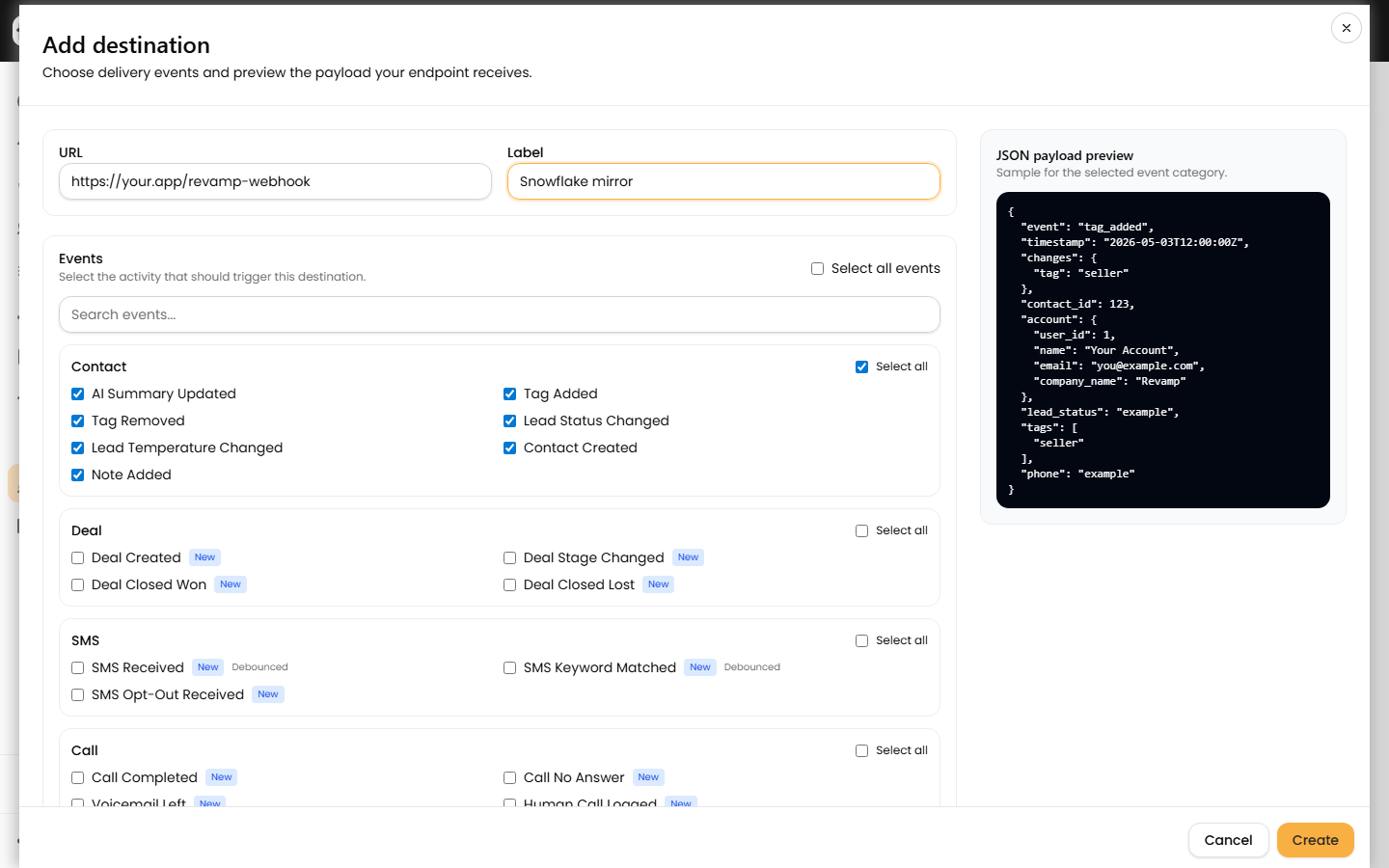
- Click Add endpoint.
- Enter your receiving URL. Must be
https://and resolve to a public host (not a private IP). - Optionally enter a label ("Slack alerts", "Snowflake mirror", etc.).
- Tick the events you want pushed. Select All sends everything.
- Click Save.
A signing secret is shown once on creation. Copy it before closing the dialog. You need it to verify the HMAC on every incoming POST.
Step 2 — What the POST looks like
Every event arrives as a JSON document with a stable shape:
POST /your-endpoint HTTP/1.1
Host: your.app
Content-Type: application/json
X-Webhook-Signature: sha256=<hex_hmac_of_request_body>
X-Webhook-Event: tag_added
X-Webhook-Delivery: 01HZX…<ulid>

{
  "event": "tag_added",
  "delivery_id": "01HZX…",
  "occurred_at": "2026-04-27T18:14:22Z",
  "contact": {
    "id": 12345,
    "first_name": "Jane",
    "last_name": "Doe",
    "email": "jane@example.com",
    "phone": "+15125550100",
    "lead_status": "QUALIFIED",
    "tags": ["seller", "motivated", "hot-lead"]
  },
  "change": {
    "tag": "hot-lead"
  }
}
Always trust contact.id for matching, not name/email.
Step 3 — Verify the HMAC signature
Before processing the body, verify the X-Webhook-Signature header. Reject any request whose signature doesn't match.
The signature is hmac_sha256(raw_body, signing_secret), hex-encoded, prefixed with sha256=.
Node.js (Express)
const crypto = require('crypto');

app.post('/revamp-webhook', express.raw({ type: 'application/json' }), (req, res) => {
  const sig = (req.get('X-Webhook-Signature') || '').replace(/^sha256=/, '');
  const expected = crypto
    .createHmac('sha256', process.env.REVAMP_WEBHOOK_SECRET)
    .update(req.body)
    .digest('hex');
  if (sig.length !== expected.length || !crypto.timingSafeEqual(Buffer.from(sig), Buffer.from(expected))) {
    return res.sendStatus(401);
  }
  const event = JSON.parse(req.body.toString('utf8'));
  // … process …
  res.sendStatus(202);
});
PHP (Laravel)
$raw = $request->getContent();
$sig = str_replace('sha256=', '', $request->header('X-Webhook-Signature', ''));
$expected = hash_hmac('sha256', $raw, config('services.revamp.webhook_secret'));
if (! hash_equals($expected, $sig)) {
    abort(401);
}
$event = json_decode($raw, true);
Retries + status
Your endpoint should respond with a 2xx status as quickly as possible. Anything else (timeouts > 15s, 4xx, 5xx) is treated as a failure.
| Log status | Meaning |
|---|---|
success |
Endpoint returned 2xx within 15s. |
pending_retry |
Failed once. Will retry with exponential backoff. |
failed |
All retries exhausted. Manual Retry button is available. |
Open Webhooks → Delivery Logs to inspect every POST: full request body, headers, response status, response time, and the retry count.
Limits + safety
| Limit | Default |
|---|---|
| Endpoints per user | 10 |
| Receiver timeout | 15 seconds |
| Max payload size | 1 MB |
| Private / loopback URLs | Blocked (SSRF guard) |
Endpoints to private IPs (10.x, 192.168.x, 169.254.x, etc.) are rejected on save. Use a public ingress or a tunnel service for local development.
Troubleshooting
| What you see | Likely cause | Fix |
|---|---|---|
| Endpoint won't save — "URL not allowed" | SSRF guard rejecting private host. | Use a public domain. Tunnels (ngrok, Cloudflare) work. |
All deliveries failed with no response body |
Receiver timing out (> 15s). | Acknowledge fast (queue work + return 202 immediately). |
| Receiver gets 401 from your own check | Reading parsed JSON instead of raw body for HMAC. | HMAC over raw bytes — no JSON re-serialization. |
| Same contact triggers 3 events at once | Working as designed — one user action ⇒ multiple events. | De-dupe in your receiver using delivery_id. |
| Endpoint disappeared | Deleted by an admin. Logs are kept. | Recreate the endpoint; logs remain searchable. |
FAQ
Is the order of events guaranteed?
No. Process events idempotently. occurred_at tells you when the source change happened.
Can I rotate the signing secret? Yes — edit the endpoint, click Rotate secret. Old secret stops working immediately, so update your verifier in the same window.
What's the difference between this and CRM Sync? CRM Sync is a managed integration with Podio/Salesforce that does field mapping. Outbound webhooks are raw event streams to any URL — bring your own translation layer.
Do deletes fire an event? Not currently. Add it to your wishlist with support if you need it.
Are deletes of an endpoint reversible? Endpoints are hard-deleted, but Delivery Logs for past traffic are retained. Recreate the endpoint with the same URL to resume.