
The Deal Pipeline is where you track active real estate deals from contract to close, separately from your raw leads in the Contacts CRM. You open it from Pipeline in the left sidebar. Pipeline is part of the Dealmaker Syndicate plan.
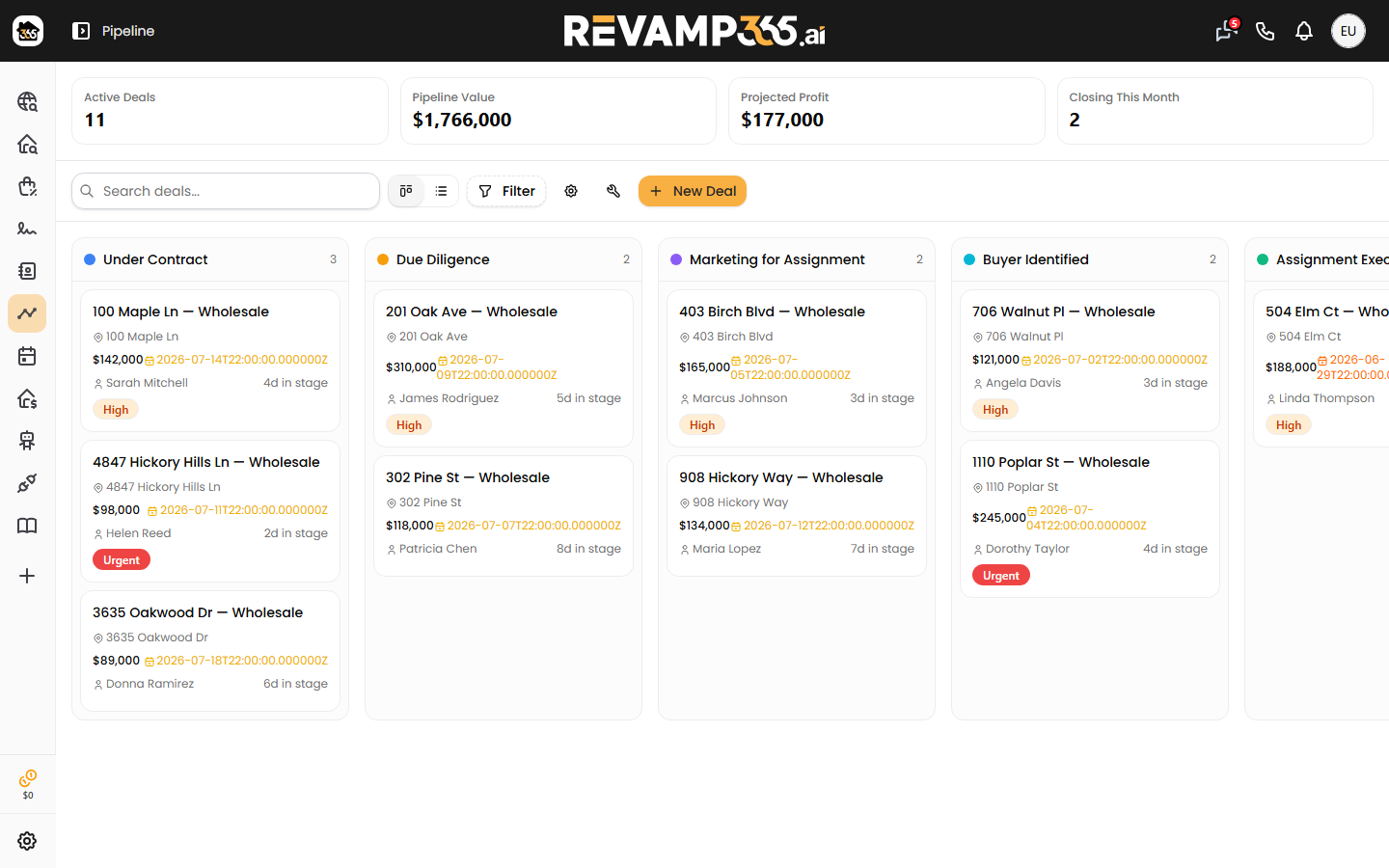
What the pipeline is for
A lead becomes a deal once you are working it toward a closing. The pipeline gives each deal its own card, a stage in your workflow, financials, tasks, documents, and an activity log — so you always know what's outstanding and what every deal is worth.
You can run separate pipelines per deal type, each with its own stages:
- Wholesale
- Fix & Flip
- Buy & Hold
- Listed Sale
- Other
Stages and views
Each deal type seeds a default set of stages the first time you open it. Wholesale, for example, runs Under Contract → Due Diligence → Marketing for Assignment → Buyer Identified → Assignment Executed → Title & Closing → Closed. Other deal types get stages tuned to that strategy. You can rename, recolor, reorder, add, or delete stages to match how you work — see Customize Pipeline Stages.
Switch between two layouts from the toolbar:
| View | Best for |
|---|---|
| Kanban board | Dragging deal cards between stages |
| Table | Scanning many deals by title, price, closing date, and status |
Moving a card to a new stage can auto-create that stage's checklist tasks, so the next steps appear without retyping. See Move and Bulk-Update Deals.
Deal cards and financials
Open any deal to see tabs for Activity, Documents, Photos, Tasks, Contacts, and Financials. The Contacts tab links the seller, buyer, title company, and lender to the deal; the Activity tab logs every stage change and note automatically.
The Financials tab groups numbers into Revenue (contract price, ARV, marketing price), Costs (rehab, holding, selling, earnest money), and Profit. Revamp365 auto-computes the assignment fee and projected profit from the figures you enter, and flags any value you override so you can reset it to the calculated amount. Details are in Add Deal Financials: ARV, Repairs, MAO.
A stats bar across the top rolls up your active deals, total pipeline value, projected profit, deals closing this month, win rate, and average days to close.
How deals flow through it
- Create a deal from a contact, or add a new one with the New Deal button.
- Work it stage by stage as tasks get done.
- Update financials and attach contracts, photos, and documents.
- Optionally push a wholesale deal to your My Deals marketplace listing.
- Close it as won or lost — closing a deal also updates the linked contact's lead status.
To get hands-on, start with Creating and Managing Deals. New to the CRM side first? See What Is the Contacts CRM.