
When you register an A2P 10DLC campaign, carriers and TCR want to see exactly how consumers consent to your texts. Revamp365 generates a hosted opt-in page that shows the unchecked consent checkbox, the disclosure language, sample messages, and your business verification — and captures a real, timestamped consent record every time someone opts in.
Where the opt-in page lives
Each compliance page is published at a top-level slug, https://revamp365.ai/{slug}, with a dedicated SMS opt-in screen at https://revamp365.ai/{slug}/opt-in. Legacy /compliance/{slug} URLs still resolve, so any link you already submitted keeps working. The page only renders once it is published (generation_status is ready or needs_review and published_at is set); an unpublished slug returns 404.
The opt-in screen is server-rendered for crawlers, so a non-JS carrier or TCR bot sees the business name, disclosure, sample messages, and working Privacy/Terms links in the first HTML response — not an empty app shell.
What a carrier reviewer sees on the page
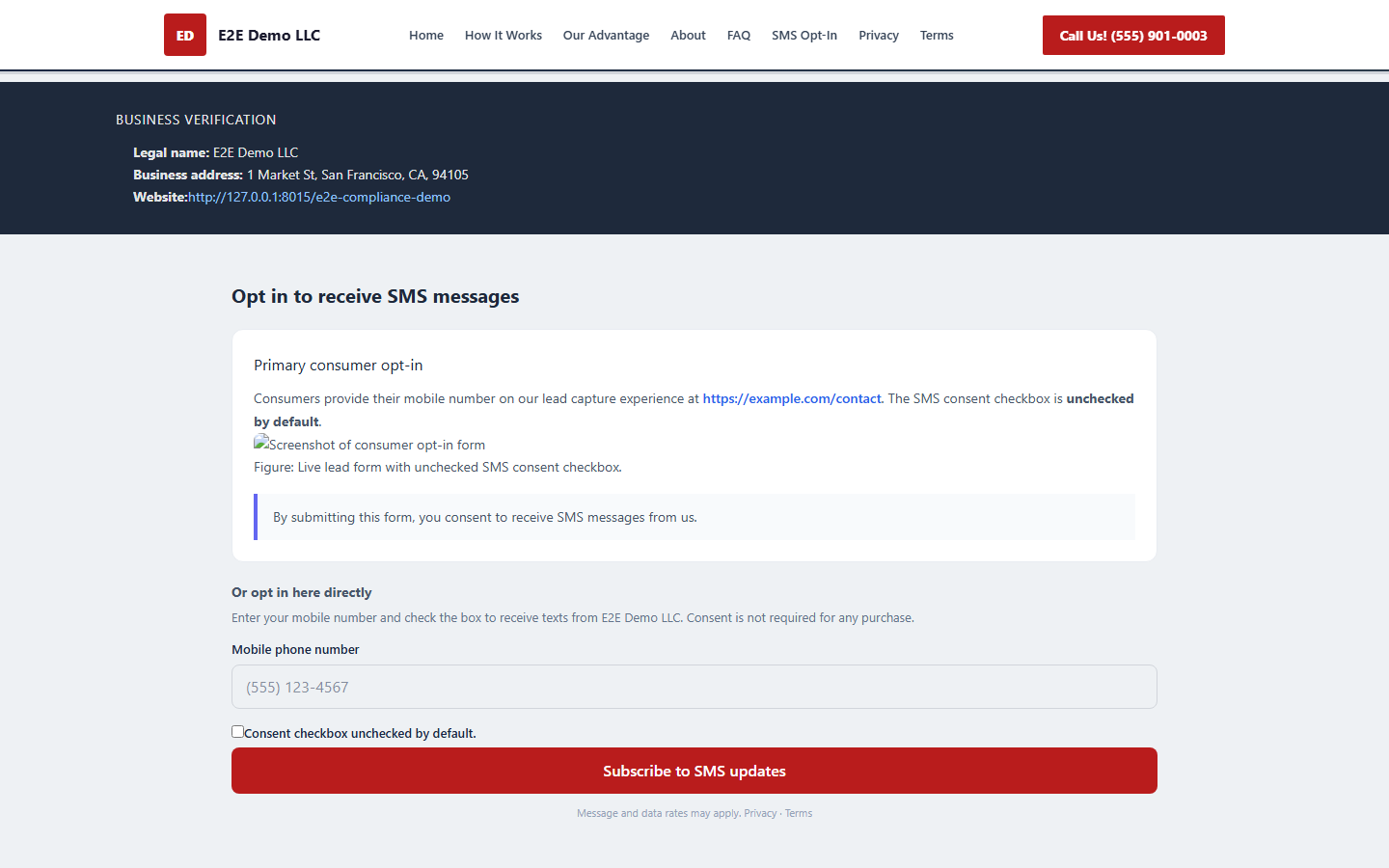
The /opt-in page renders three reviewer-facing blocks:
- Business verification — legal name, DBA, state of incorporation, year founded, physical address, and your operating website, pulled from your Trust Hub profile.
- Primary consumer opt-in — the lead-capture form with an SMS consent checkbox that is unchecked by default, plus your disclosure text.
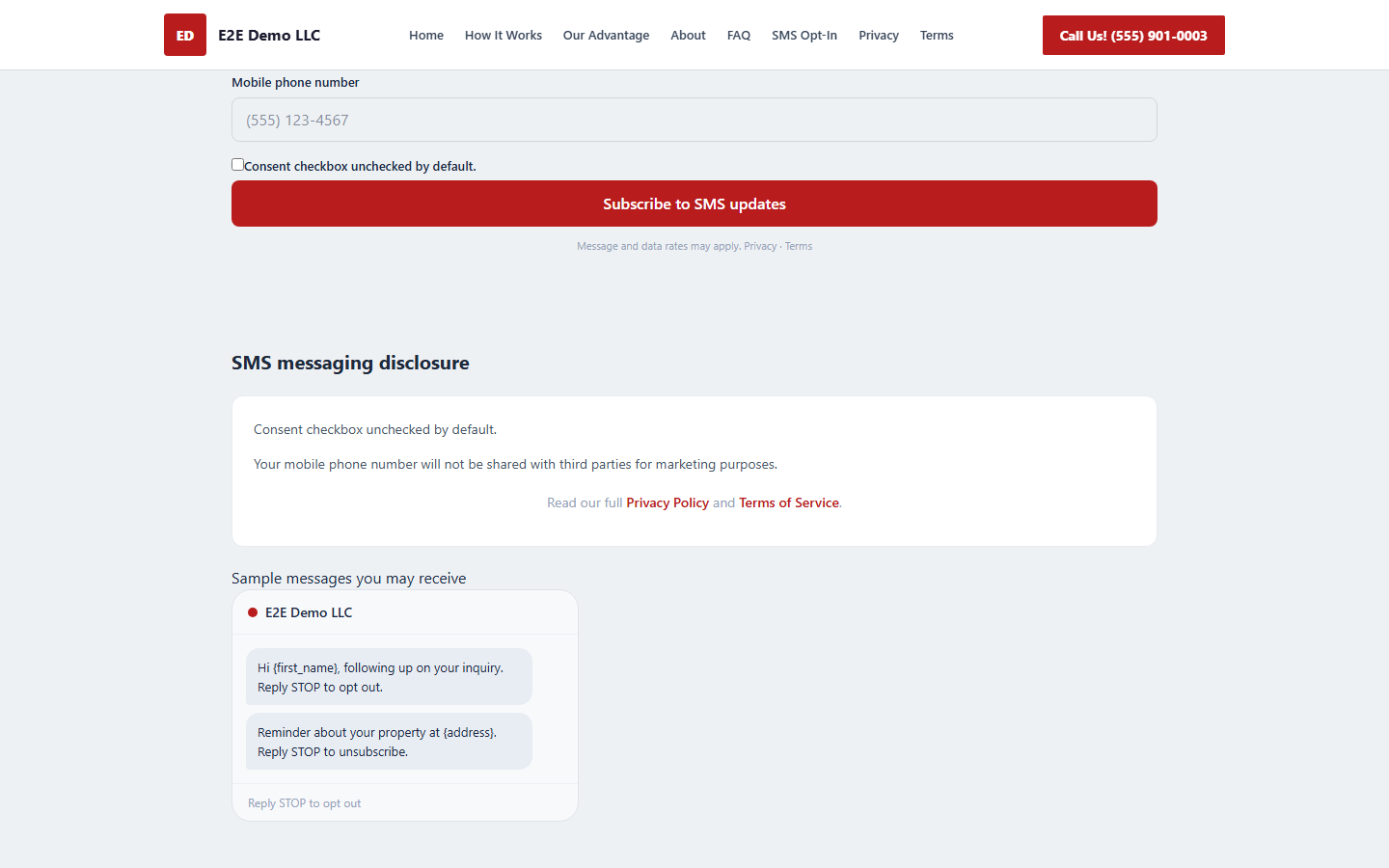
- SMS messaging disclosure — the full consent language, a line stating your number is not shared with third parties for marketing, Privacy/Terms links, and a phone mockup of your sample messages footed with "Reply STOP to opt out."
Two ways to prove opt-in
In the campaign review wizard you pick where consent is collected:
| Option | What carriers review | What you must supply |
|---|---|---|
| The compliance page Revamp365 hosts (Recommended) | Your live hosted opt-in page | Nothing extra — the checkbox and disclosures are already on the page |
| My own website | Your external lead form | Primary opt-in URL (https://), exact consent language, and a screenshot of the unchecked checkbox |
If you choose the hosted page, the wizard requires it to be published before you continue. If you choose your own site, all three evidence fields are mandatory, and the URL cannot be a Revamp365-hosted address.
Steps to publish your proof page
- Generate the compliance page so it gets a slug and
published_attimestamp. - Open the A2P campaign review wizard and, under opt-in source, select The compliance page Revamp365 hosts for me.
- Confirm the green banner shows your live page URL, then visit
/{slug}/opt-inand verify the consent checkbox is unchecked and the Privacy and Terms links open. - Submit the campaign for carrier review.
For the prerequisites that gate publishing, see the Trust Center activation checklist.
What gets captured as consent proof
When a consumer enters a valid 10-digit US mobile number and checks the box, Revamp365 normalizes the number to E.164 and writes an A2pOptInConsent record. It snapshots the exact disclosure shown (re-derived server-side, never trusted from the browser) plus the IP address, user agent, and consented_at timestamp. Re-opting in with the same number updates the existing record in place instead of creating duplicates, and a submission without the checkbox is rejected with a 422.
The default disclosure includes "recurring SMS/MMS," "Msg & data rates may apply," "Reply STOP to opt out or HELP for assistance," and "Consent is not a condition of purchase."
If carriers reject the campaign over consent evidence, see how to fix a rejected A2P campaign.