
When carriers reject your A2P 10DLC campaign, Revamp365 marks it FAILED and shows the carrier's reason so you can fix the copy and resubmit. Here is where the rejection appears and how to correct the most common causes.
Where the rejection shows up
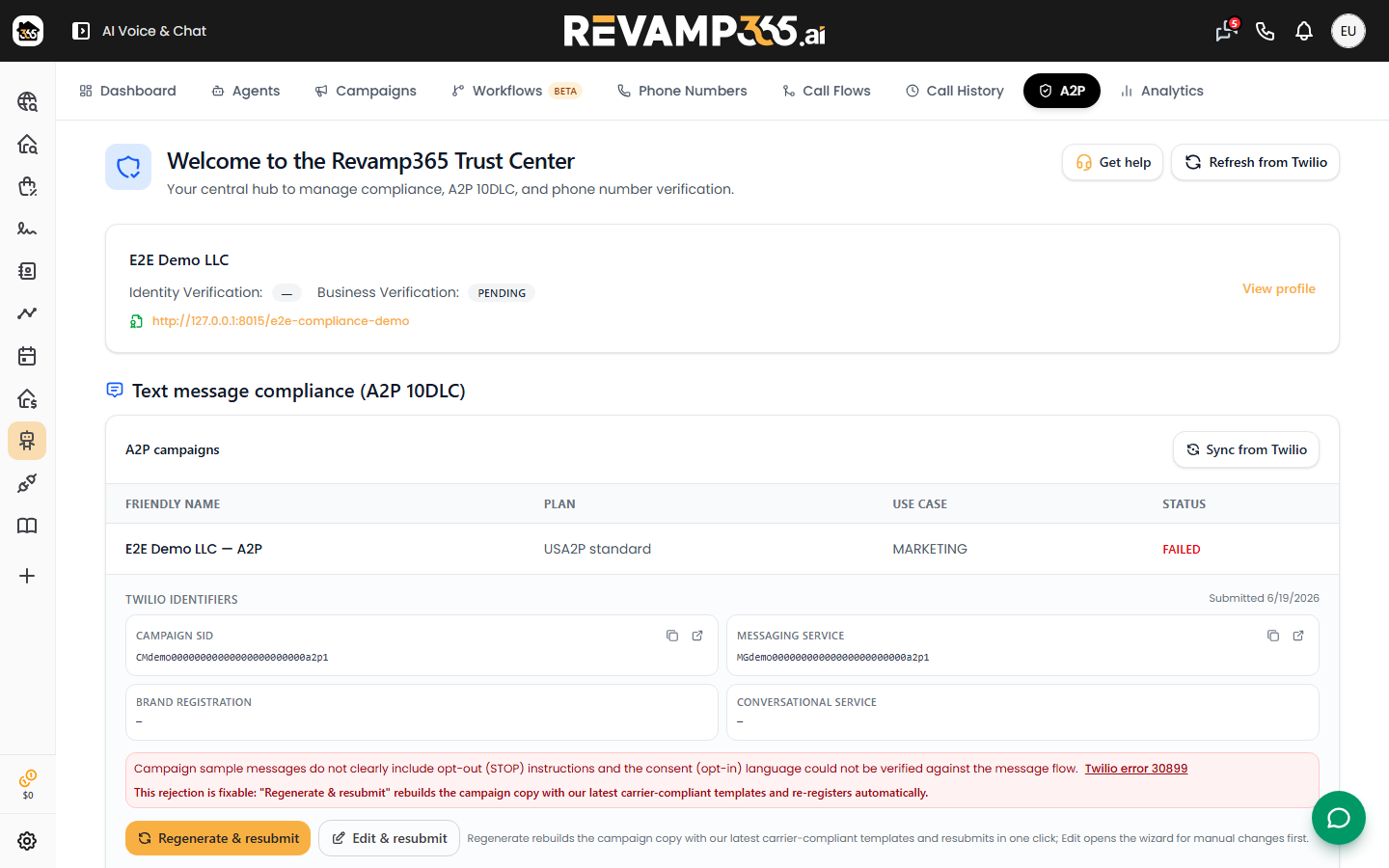
Open the Trust Center at /ai-voice?tab=a2p and scroll to the Text message compliance (A2P 10DLC) section. In the A2P campaigns table, a rejected campaign shows a red FAILED status (the table relabels VERIFIED as ACTIVE and IN_PROGRESS as IN PROGRESS).
Directly under the Twilio identifiers, the carrier's rejection_reason is printed in a red box. If you have resubmitted before, expand Previous attempts to see each prior attempt's status and its own rejection text — useful for spotting a recurring issue.
Edit and resubmit
A FAILED campaign shows an Edit & resubmit button. Click it to open the Review A2P campaign wizard, which walks six steps: Opt-in, Basics, Messaging, Samples, Number, and Review.
- Fix the offending fields (see the table below).
- On the Review step, run Check approval. The Approval Copilot returns a red / amber / green verdict and lists per-field issues tagged blocker, warning, or suggestion.
- Clear every blocker. The Submit to carriers button stays disabled on a red verdict or while any blocker remains, and editing after a check marks the verdict stale until you re-check.
- Click Submit to carriers. Each resubmission registers a fresh campaign and incurs its own at-cost vetting fee; review then typically takes 5–15 business days.
Common rejection reasons and fixes
| Rejection cause | What to change in the wizard |
|---|---|
| Sample-message mismatch | On Samples, give at least two messages that match your stated use case; at least one must contain the word STOP. |
| Missing opt-out / help | Include STOP (opt-out) and HELP in your samples and message flow. |
| Privacy clause missing | On Messaging, the Privacy field must contain the exact clause "Mobile information will not be shared…" with third parties for marketing. |
| Opt-in proof (own website) | On Opt-in, choosing My own website requires the opt-in URL, the verbatim consent disclosure, and a screenshot of the unchecked SMS checkbox. |
| Business identity mismatch | The business name in your copy must match your Trust Hub legal/brand name. |
| Cold or purchased contacts | Describe inbound consent only — never reference cold outreach, purchased lists, or skip-traced numbers. |
| Unfilled placeholders | Replace any remaining [bracketed] tokens in the description, flow, consent, or samples. |
The simplest opt-in path is the hosted compliance page Revamp365 builds for you (the Recommended option) — carriers review the live page, so no screenshot is needed. To strengthen that page first, see create a compliant opt-in proof page.
When copy edits will not help
A few carrier codes cannot be cleared by regenerating copy. Codes 30882, 30885, and 30955 require a campaign change or support; code 30930 means the brand hit its campaign limit — delete or consolidate unused campaigns first. If your status sits at MANUAL SETUP or the brand itself was rejected, that blocks the campaign upstream; resolve the brand before resubmitting. Once verified, you can run a SMS blast campaign from your enabled number.