
The Signing Profile is the buyer identity Offer Bot stamps onto an agreement when you generate a PDF. Set it once. You do not upload a signature image — you type the name and initials and pick a handwriting style.
Open Signing Profile
- In the left sidebar, click Offer Bot.
- Open the Signing Profile tab. This is account-level — set it once and every generated offer uses it until you change it.
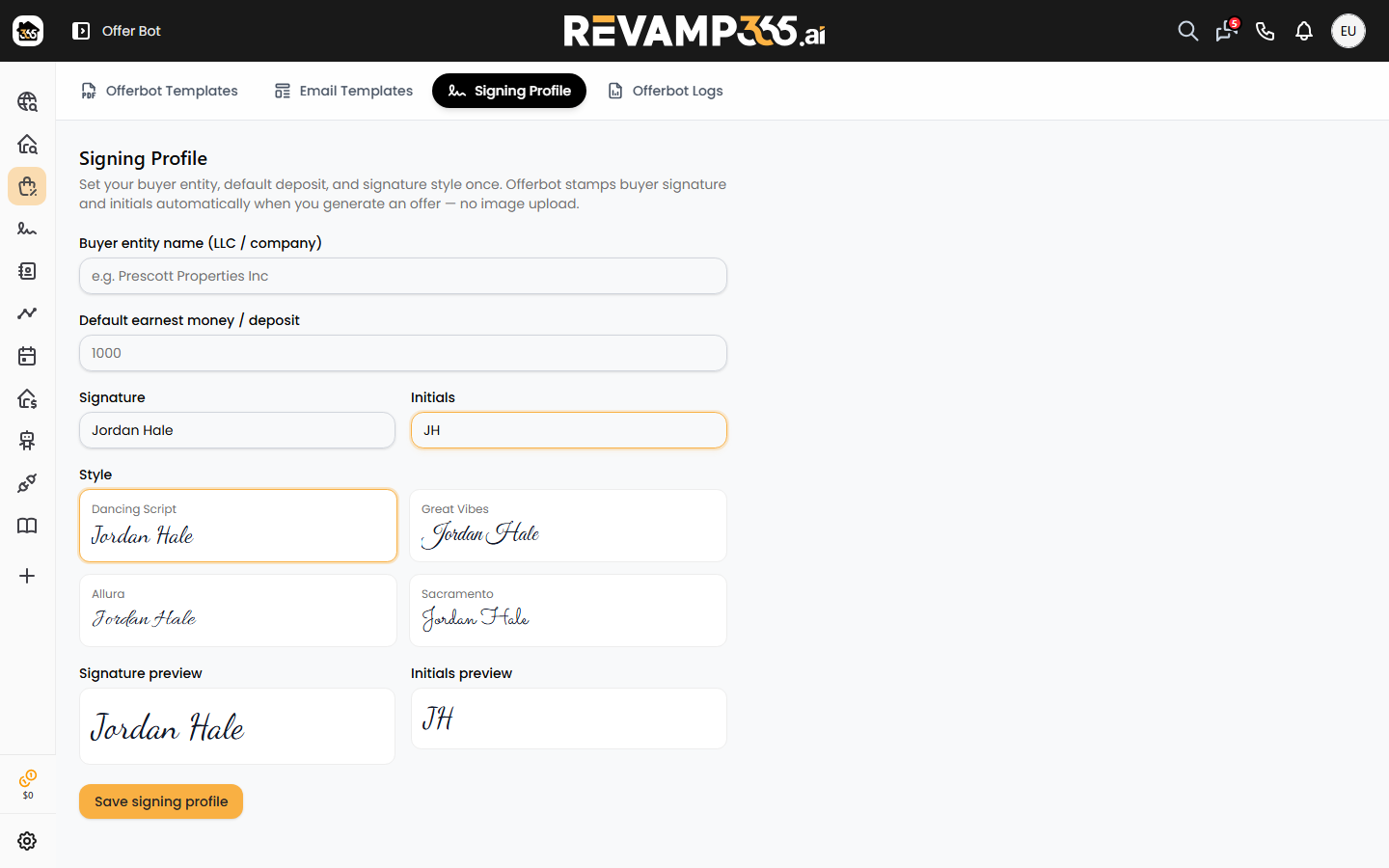
Fill in the profile
- Buyer entity name — the LLC or company that should appear as the buyer when that field is mapped.
- Default earnest money / deposit — used when a deposit field is mapped and you do not override it at send time.
- Signature — type the signature exactly as it should appear on the PDF.
- Initials — type the initials exactly as they should appear.
- Style — pick a handwriting style. The live preview updates as you type.
Click Save signing profile.
How it is used
When you generate an offer from Automated Offers, buyer signature and initial slots on the PDF stamp from this profile. Listing data still comes from the MLS listing; offer price still comes from the amount you type on each row.
You can change the profile later. New generates use the latest saved values. Already-sent PDFs are not rewritten.
Continue with mapping PDF fields and sending from a saved list.