
The Legislation Tracker monitors wholesale real-estate and investor bills across all 50 states plus the U.S. Congress, syncs them daily from LegiScan, and adds an AI summary of how each bill affects wholesalers. Use it to spot licensing, disclosure, and contract-assignment changes before they hit your deals.
Open the tracker
- In the left sidebar, open Resources.
- Click Legislation Tracker (the scale icon). This loads the national map at
/resources/legislation.
The page is public, so you can also share it with partners who do not have a Revamp365 login.
Read the national map
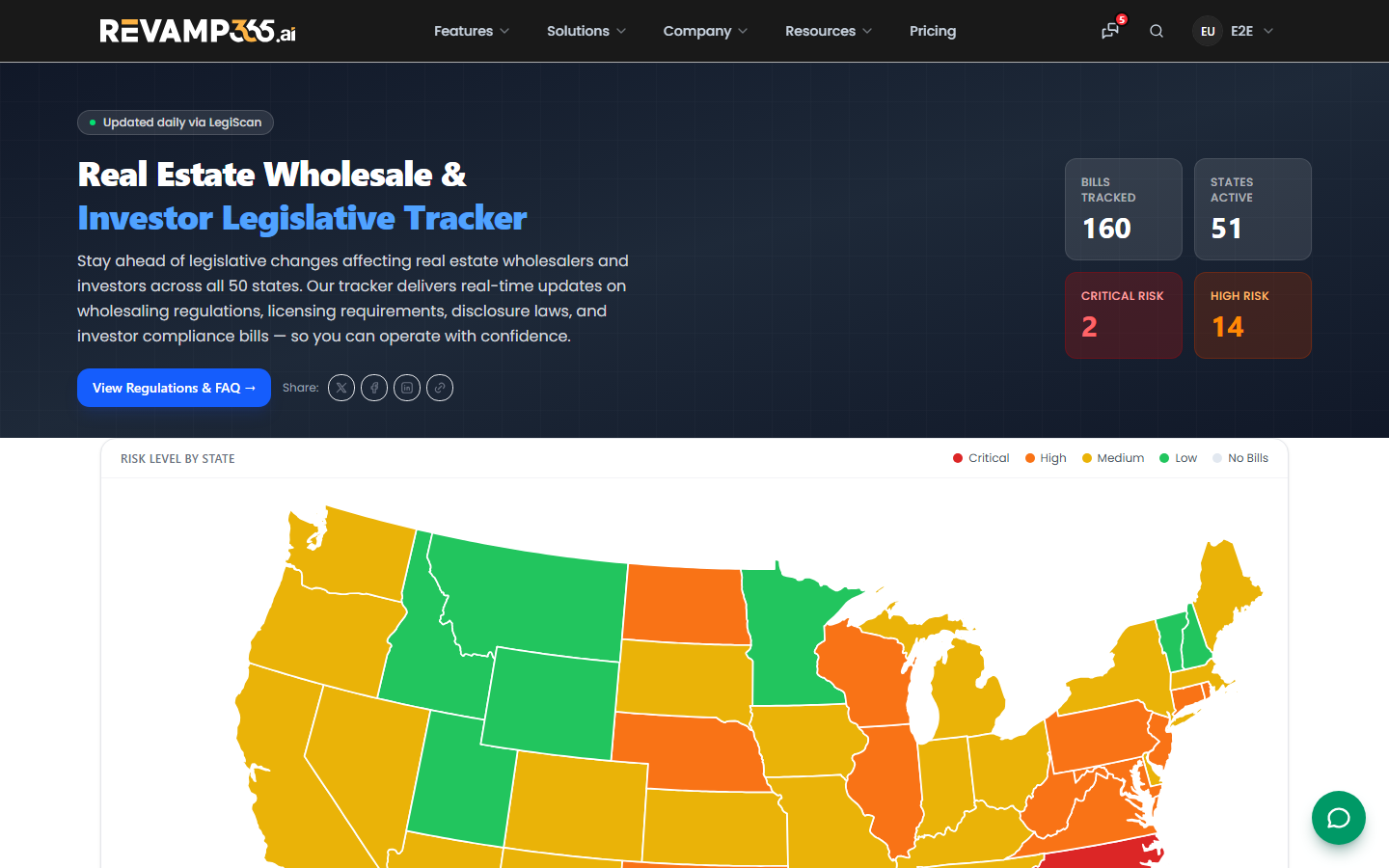
The landing page shows a color-coded U.S. map and matching jurisdiction grid. Each state is shaded by its highest active risk level:
| Color | Risk level |
|---|---|
| Red | Critical |
| Orange | High |
| Yellow | Medium |
| Green | Low |
| Gray | No Bills |
Hover any state for a tooltip with its risk and bill count. The hero cards summarize Bills Tracked, States Active, Critical Risk, and High Risk totals across the country. Data syncs daily at 03:00 UTC.
Drill into a state
Click any state on the map or in the grid to open its detail page. There you can:
- Filter bills with the All / Active / Enacted toggle. "Active" shows introduced and in-committee bills; "Enacted" shows passed and effective laws.
- Read each bill card, which shows the bill number, a status badge (Introduced, In Committee, Passed, Enacted, or Failed/Dead), and a colored risk badge.
- Open View Full Legislative Bill to read the official LegiScan source in a new tab.
- Page through results — 20 bills load per page.
Use the AI bill analysis
Every analyzed bill includes two AI-written sections:
- Summary — what the bill does in plain English.
- What This Means for Wholesalers — the practical impact on assignment, marketing, or licensing.
A tag classifies each bill as license required, marketing restricted, disclosure required, registration required, or other. Newly synced bills may show "AI analysis pending" until the analysis job runs.
Find answers and share
- Use View Regulations & FAQ in the hero for national questions on wholesaling legality, equitable interest, and double closings. State pages carry their own FAQ accordion.
- Use the share buttons on any page or bill card to send a link to a partner or attorney.
To compare market-level data alongside legislative risk, see Use market data.
Bill data is sourced from LegiScan and is not legal advice. Always confirm compliance with a licensed real-estate attorney in the relevant state before changing how you operate.