
When a webhook posts a lead into Revamp365, the Field mapping step of an Inbound Lead Source tells the system which incoming JSON field becomes which contact field. Leave it empty and Revamp auto-detects common shapes; map it when your payload uses nested or unusual field names.
Open the field mapping editor
- Go to Integrations & Apps, then Webhooks.
- Open the Receive Data tab (marked BETA).
- Click New source, or Edit an existing source, then advance to the Field mapping step (step 3 of the Basics, Security, Field mapping, Test, Done wizard).
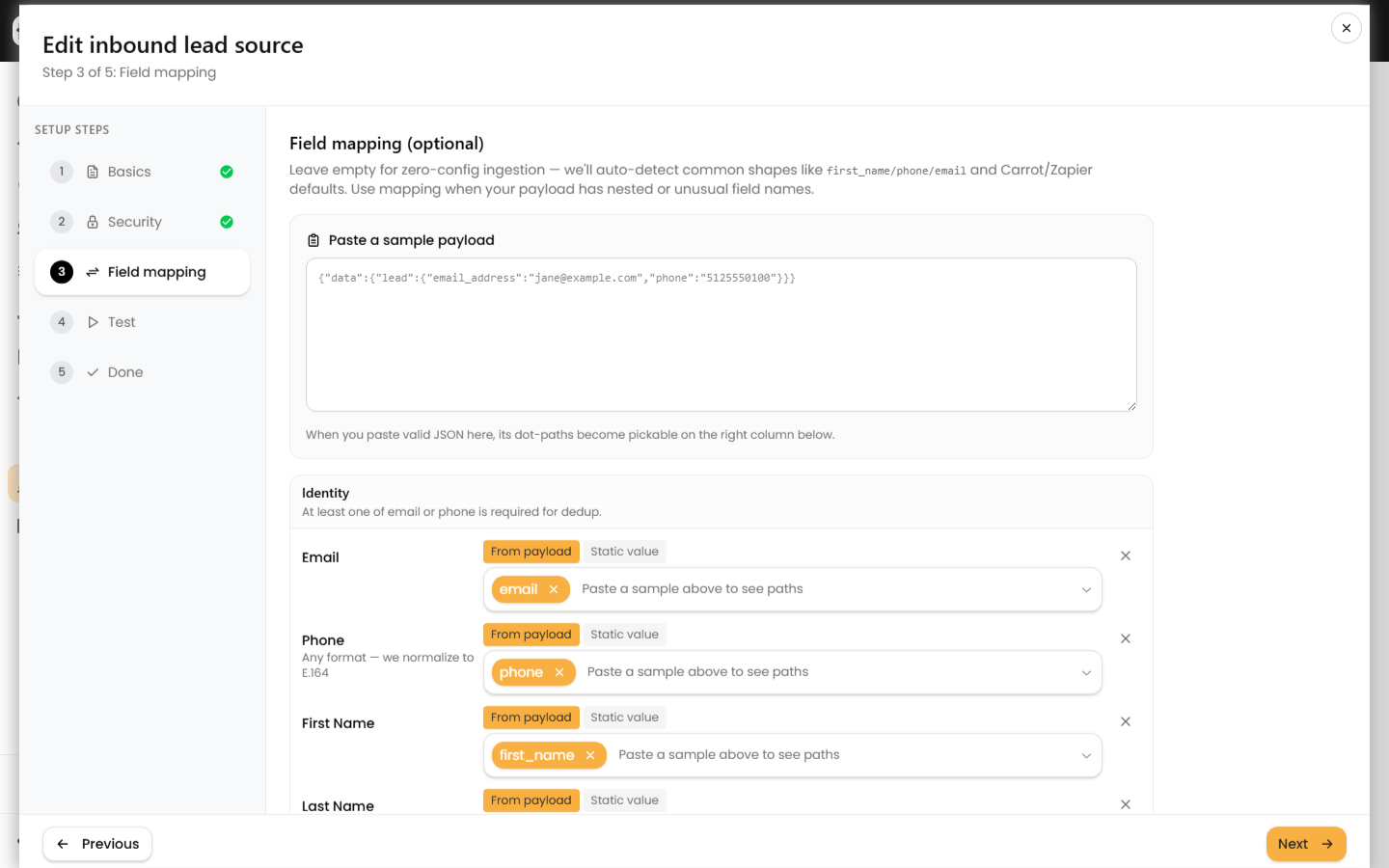
Paste a sample to unlock path pickers
At the top of the editor, paste one real JSON body your source sends into the Paste a sample payload box. Revamp flattens it into dot-paths (for example data.lead.email_address or contacts[0].phone) and those paths become selectable in every field's picker. Without a sample you can still type a path by hand.
Map each canonical field
Fields are grouped so you map the right thing to the right column:
| Group | Canonical keys | Stored on the contact as |
|---|---|---|
| Identity | email, phone, first_name, last_name | email, phone (normalized to E.164), first/last name |
| Mailing address | address, city, state, zip | mailing_* columns |
| Property address | property_address, property_city, property_state, property_zip | Most Recent Property (mrp_*) columns |
| Lead lifecycle | lead_source, lead_status, lead_temperature, lead_manager_email | lead fields; lead_manager_email auto-assigns the matching team user |
| Classification & lists | contact_type, deal_type, price_range, counties, lists, tags | array fields, union-merged with existing |
| Provenance & notes | external_id, notes | external_id (dedup), notes (saved as a timeline note) |
Each row has two modes:
- From payload — pick or type the source path. The value is read from the incoming JSON.
- Static value — type a literal (such as
Facebook Ads) applied to every lead, regardless of payload. Stored internally asstatic:plus your text.
Use the X at the end of a row to clear a mapping.
Capture anything else as custom fields
Under Custom fields, click Add custom field, name it, and point it at a payload path or a static value. Each entry is saved as custom_fields.<name>. If no matching custom field definition exists yet, Revamp creates a text custom field automatically (capped at 50 auto-created fields per account), so unmapped extras are never silently dropped.
What happens when mapping is empty
With no mapping saved, Revamp runs a heuristic pass that recognizes:
first_name/last_name, or a singlefull_name/nameit splits into two.phone,mobile,cell,phone_number, or aphone_numbersarray.emaildirectly or inside anemailsarray.- Property fields like
property_streetorsubject_property_address.
Test before you trust it
On the Test step, paste a sample and click Send test. It is a dry run — nothing is written. The Preview shows whether the lead would create a new contact or merge into an existing one (dedup checks external_id, then phone, then email), plus the normalized phone and email. Switch to Canonical to confirm each field landed where you intended.
A few rules to keep in mind:
- On a merge, scalar fields only fill blanks; existing
lead_sourceandlead_statusare preserved. Tags and the other array fields are union-merged. - A lead with no usable phone, email, or external_id is ignored, so map at least one identity field.
To watch real submissions and replay failures, see Read Inbound Lead Logs and Retry Failed Leads.