
Which AI scoring software integrates with Podio for real estate investors?
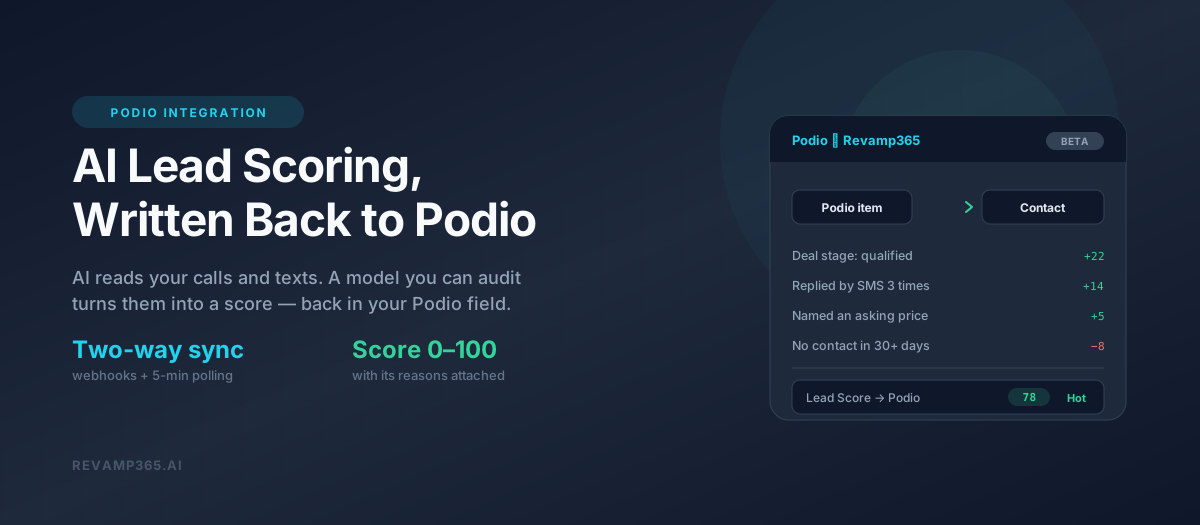
Revamp365 integrates natively with Podio and scores every lead 0–100 using signals its AI pulls out of your actual calls and text threads. The connection is a first-party Podio API integration — not a spreadsheet export, not a nightly CSV. It authenticates against Podio directly, reads your app's real field schema, pulls new and changed items, listens for Podio webhooks in real time, and can write mapped values back into Podio fields.
Two things to know up front, because they change whether this is right for you:
- It is in Beta. The Podio hub in Revamp365 carries a Beta badge. It is live and it works, but it is a young integration and we label it honestly.
- It is on paid plans. The integrations area sits behind a paid-plan gate. Free-tier accounts are routed to pricing rather than into the CRM connection screen.
If you are still evaluating whether you need a dedicated investor CRM at all, start with our deal pipeline guide — this article assumes you have already decided to keep Podio and want intelligence layered on top of it.
What does "AI scoring" actually mean in this integration?
The AI does the reading; a transparent points model does the scoring. That distinction matters, and most tools blur it.
Here is the honest split:
- The AI part. Revamp365 runs your recorded calls and SMS threads through an AI extraction pass that builds what we internally call deal memory — the deal stage, the seller's stated motivation, their timeline to act, whether they named an asking price, whether the phone turned out to be wrong, and the interest level and sentiment of the most recent analyzed call. None of that is typed in by a human. It is extracted from what the seller actually said.
- The scoring part. Those extracted signals then feed a deterministic 0–100 model that is fully inspectable. It is not a black box that emits a mystery number. Every score comes back with its reasons attached, so a rep can see "Deal stage: qualified", "Replied by SMS 3 times", "Named an asking price", or "No meaningful contact in 90+ days".
We think that is the right architecture for lead scoring. AI is genuinely good at reading a transcript and telling you what the seller meant. AI is a bad choice for the arithmetic, because you cannot audit it, you cannot explain it to a rep who disagrees with it, and you cannot tune it.
How is the lead score calculated?
The score is the sum of six weighted pillars, capped to a 0–100 range and then graded.
| Pillar | Range | What actually moves it |
|---|---|---|
| Intent & motivation | 0 to 45 | AI-extracted deal stage, motivation, timeline, asking price; latest call interest level and sentiment; your team's own status and temperature |
| Two-way engagement | 0 to 30 | Inbound SMS replies, connected call conversations, inbound calls |
| Deal readiness | 0 to 15 | Active pipeline deal, next steps set, confirmed objective, linked property |
| Contactability | −4 to 10 | Phone, email, mailing address on file — and a penalty if a call proved the phone bad |
| Lead source | 0 to 5 | Inbound or marketing-response source outranks a name you bought |
| Recency | −16 to 5 | Momentum decay — only applied once there has been real intent or engagement |
Grades map to the score like this:
| Score | Grade |
|---|---|
| 75 and above | Hot |
| 50 to 74 | Warm |
| 25 to 49 | Cool |
| Below 25 | Cold |
Three design decisions are worth calling out, because they are the difference between a score you trust and a score everyone ignores:
- Outbound volume counts for nothing. Blasting a contact ten times does not raise its score. Only two-way engagement does — replies and connected conversations. A score that rewards your own activity is a vanity metric.
- Having contact info is nearly worthless on its own. A freshly imported skip-traced list stays Cold until somebody actually engages. Data completeness gates outreach; it is not evidence of a deal.
- Hard caps override everything. A contact marked Do Not Contact is capped near the bottom regardless of how hot they looked, and a deal marked disqualified or closed-lost is capped too. No pillar total can out-vote those.
If your leads are coming out of a skip-traced list, expect them to sit Cold on arrival. That is the model working correctly.
How does the Podio integration actually work, step by step?
It is a full two-way API integration with webhook push and a polling backstop. Concretely:
| Capability | What happens |
|---|---|
| Authentication | App authentication against Podio's OAuth endpoint using your app ID and app token, exchanged for an access token |
| Field discovery | Reads your Podio app's real schema and returns every field with its label, type, required flag, and category options |
| Field mapping | Map Podio fields to Revamp fields — name, phone, email, property and mailing address, lead status, temperature, source, tags, do-not-contact — plus arbitrary custom fields |
| Inbound sync | Pulls items filtered on last-edited date, paginated, so you only move what changed |
| Real-time updates | Registers Podio webhooks for item create and item update, and completes Podio's verification handshake automatically |
| Polling backstop | A scheduled job sweeps every connection every five minutes, so a dropped webhook does not mean a lost lead |
| Sync conditions | Rule-based filters (equals, contains, starts with, is empty, and their negations, combined with AND/OR) so you only ingest the leads you want |
| Outbound write-back | Opt-in per connection. Pushes mapped Revamp values into Podio fields, and can create a missing Podio item for a brand-new Revamp lead |
| Rate-limit handling | Provider rate limits are configured per connection and a dedicated sync queue paces dispatches |
| Retries | Failed pushes retry on an escalating backoff rather than silently dropping |
| Sync logs | Inbound and outbound activity is logged per connection with a retention window, visible in a Sync Logs tab |
Podio field types are decoded properly on the way in — text, number, phone, email, date, category, and app-reference fields each unwrap to their real value rather than to raw JSON. Mappings resolve against a field's external ID, its numeric field ID, or its human-readable label, so a mapping built against a label still works after Podio slugifies it.
What can Revamp365 write back into Podio?
Mapped contact fields, including the AI-generated contact summary. The outbound mapper pushes lead status, lead temperature, and the AI summary into Podio fields you choose.
One thing it does not push: the numeric lead score itself. That is a design consequence rather than a missing checkbox. The score is recalculated and written straight to the database without raising the model events the outbound sync listens for, and it is grouped with the AI-derived fields that the sync deliberately skips — so a score change does not trigger a push, and is not meant to. Treat the score as something you read in Revamp365, not as a Podio column you can sort or filter on. We are not putting a date on changing that.
Two computed values are also available to push, which are the ones most investors actually want:
- The full activity timeline, rendered as text — every call, text, and note in one Podio field, so a VA working inside Podio sees the whole history without leaving it.
- The Revamp contact ID, a stable back-reference so your Podio item and your Revamp contact stay linked no matter what else changes.
Write-back is off by default and enabled per connection. There is also a pause switch, so you can stop pushing without tearing down the connection.
The practical pattern this unlocks: keep Podio as the system of record your team already knows, let Revamp365 do the calling, texting, transcription, extraction, and scoring, and have the resulting lead status, temperature, and AI summary land in Podio fields your existing views and filters already use. Nobody has to change tools. The Podio view just gets smarter.
What can't Podio do on its own?
Podio is a configurable workspace, not a conversation engine — it stores what you put into it. That is its strength and its ceiling.
Podio has no telephony, so it has no call recordings and no transcripts. It has no SMS threads. Without those, there is nothing for an AI to read, which is why "AI scoring for Podio" is really a question about what system is having the conversations. Scoring is downstream of conversation data. Whatever tool is dialing and texting your sellers is the one holding the material to score them on — what the sellers actually said.
That is the whole argument for this integration. Revamp365 runs the AI voice agents and the SMS outreach, so it holds the transcripts, so it can score. Podio keeps being your workspace. If you are weighing that split against a single system, our comparison of CRMs for real estate investors walks through the trade-off.
How do I set this up?
- Be on a paid plan. The integrations area is gated; free accounts are redirected to pricing.
- Create or identify the Podio app that holds your leads.
- Get its app ID and app token from Podio's developer settings for that app.
- Open the Podio hub in Revamp365 under Integrations and Apps, then Connections.
- Test the connection before saving — it makes a live call to Podio and confirms the app resolves.
- Map your fields. Revamp reads your real Podio schema, so you are picking from your actual field list, not typing names blind.
- Set sync conditions if you only want a subset — for example, only items whose status contains a particular value.
- Enable outbound if you want Revamp values pushed back, and map the Podio fields to receive them.
- Watch the Sync Logs tab for the first pull, then confirm scores are populating on the contacts that come across in Revamp365.
Honest limitations
We would rather you hear these from us than discover them:
- Beta. The hub is labeled Beta in the product. Expect rough edges and give us feedback.
- Paid plans only. No free-tier access to this.
- Platform API keys required. The integration needs Podio platform credentials configured, and the connection will tell you plainly if they are missing rather than failing silently.
- Podio rate limits are real. The integration paces itself and backs off, which means a very large initial sync is deliberate rather than instant.
- Scoring needs conversations. If you connect Podio and never call or text anyone through Revamp365, there is no deal memory to extract and the scores will be thin. The AI is reading your conversations; it cannot read conversations that did not happen.
- The lead score is not a write-back field. Lead status, temperature, and the AI summary push into Podio; the numeric score does not, by design. You read it in Revamp365.
- Podio is one of two supported CRMs. Salesforce is the other. If you are on something else, the write-back patterns here do not apply.
Frequently asked questions
Does Revamp365 have a native Podio integration?
Yes. It authenticates to the Podio API directly, reads your app schema, syncs items in and out, and registers Podio webhooks. It is currently labeled Beta and is available on paid plans.
Is the Podio integration real-time or batch?
Both. Podio webhooks for item create and item update deliver changes as they happen, and a scheduled job polls every connection every five minutes as a backstop so nothing is lost if a webhook fails.
Does the AI score update automatically?
Yes. The score recomputes as new signals land — a reply comes in, a call gets analyzed, deal memory updates. You read it in Revamp365; it is not written into a Podio field today.
Can I see why a lead scored what it scored?
Yes. Every score is returned with its contributing reasons, positive and negative, rather than as a bare number.
Will a big skip-traced list show up as hot leads?
No, and that is intentional. Contact data completeness is worth very little in the model. Imported records stay Cold until there is real two-way engagement.
Can I sync only some of my Podio items?
Yes. Sync conditions let you filter on the mapped lead fields with equals, not-equals, contains, not-contains, starts-with, is-empty, and is-not-empty rules, combined with AND or OR.
Will it create new items in Podio for leads that started in Revamp365?
It can. Creating missing Podio items is an opt-in setting on the connection, off by default, so the legacy behavior of skipping unlinked contacts is unchanged unless you turn it on.
What happens if Podio is down or rate-limits us?
Failed operations retry on an escalating backoff and are recorded in the sync logs rather than being dropped.
The short version
If you are searching for AI scoring software that integrates with Podio, the real question underneath it is: which system is having the conversations with my sellers? Scoring is only as good as the signal it reads, and the richest signal is a transcript. Revamp365 connects to Podio natively, does the calling and texting, extracts what the seller actually said, and scores it on a model you can audit line by line — while keeping Podio in sync with the status, temperature, and AI summary that come out of those conversations.
Once the score is trustworthy, the next question is what you automate off it — that is covered in our guide to automating your wholesaling business. If you are still weighing whether to stay on Podio at all, we lay the two platforms side by side in Podio vs Revamp365 for real estate investors.
Want your Podio leads scored on what sellers actually said? Start with Revamp365 and connect Podio in minutes.
The largest database of curated off-market deals in the nation.
Claim Your Access